Redact text
Makes text in pictures, PDFs and text files unreadable — on the device, without network, without account. A photo of a letter, a screenshot, an invoice as PDF, a log as text file: whatever is personal becomes a black bar — the rest stays readable.
Apple Silicon + Intel
from macOS 13 Android (.apk)
from Android 8
tap to install Windows (.zip)
Windows 10 and 11
unpack, selbsttest.bat Linux (.tar.gz)
x86_64
needs Tesseract All versions
everything at once
one file, 368 MB
Pre-release 2.9.0-alpha.11 · 26 November 2026 · free of charge
macOS (.dmg) — open the window, drag the app onto
Applications, done. Apple Silicon and Intel, from macOS 13. On the first start,
right-click → Open once (the program is not signed with Apple).
More convenient: .pkg installer
— double-click, it installs itself and sets everything up; after that the app starts without
a right-click.
All versions — for macOS that page instead holds the computer version
(Text-schwaerzen-macos-rechner.zip): the same as for Windows and Linux, needs
Tesseract and runs only on Apple Silicon.
What it can do
- By rules: email addresses, phone numbers, IBANs, streets and postal codes, booking numbers, header and greeting lines — in pictures, PDFs and text files
- Everything: every recognised line of text
- Choose words: the recognised words as a list; ticked words are redacted — in a picture at exactly their place, in a PDF on every page
- Mark by hand: boxes, highlighting, underline and strike-through, arrows, ellipses, text, stamps, blur — with colour, size and undo. For everything that no automatic finds: faces, number plates, signatures, handwritten notes
- Choose an area: one frame stays readable, everything else is redacted
- Text files: line by line — what matches is replaced by a bar, the rest of the file stays unchanged. Good for logs, lists and exports (.txt, .log, .csv, .md)
- Look for updates: a button under "Info" asks GitHub for a newer version. That is the only network traffic — and only when it is clicked. The program itself works without a network.
Pictures, text files, PDFs
Pictures — a photo of a letter, a scan, a screenshot, also photographed forms. The text is recognised and redacted at its place; or you draw boxes yourself, set a stamp, blur a spot. The result lies next to the original as a new picture, the original stays untouched.
Text files — logs, lists, exports. Line by line: whatever contains personal details is replaced by a bar; all other lines stay as they are. The result is a text file again, not a picture copy.
PDFs — every page is rewritten as a picture. After that the text can no longer be selected or copied; that is the price for nothing being left underneath. More under Why this is safe with PDFs.
This is what it looks like
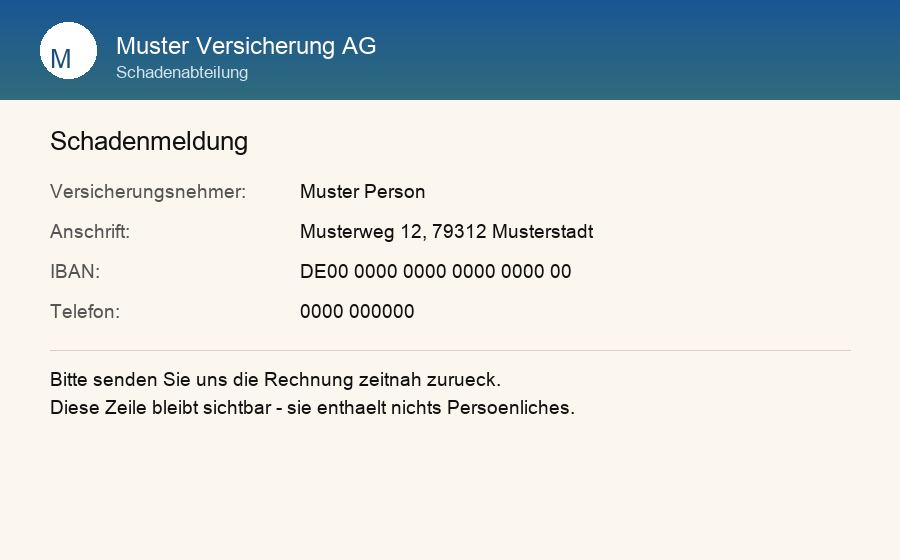
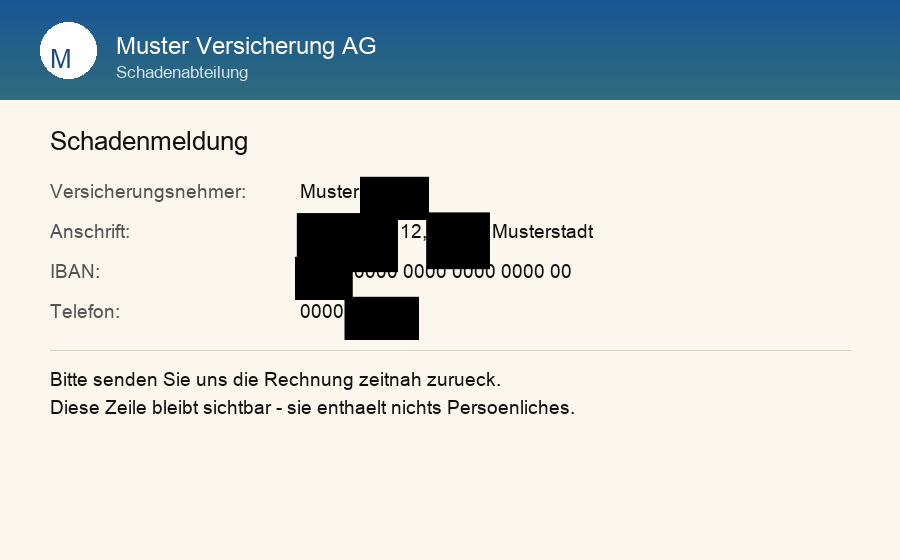
A letter as a photo — invented details (Muster Person, Musterweg, zero IBAN), redacted by the program. The text around it stays: only what you choose is redacted.
What it cannot do
- Cyrillic, Greek, Arabic and Hebrew are not recognised by the text recognition.
- The automatic does not find names without an address or number reliably — a look at the result stays necessary.
- The result is a picture PDF: afterwards nothing in it can be searched. That is intended.
Installation
macOS: open the .dmg, drag "Text schwärzen" onto
the Applications folder, close the window. On the first start macOS says the app was
"not opened because Apple cannot check it" — that is normal for programs outside the
App Store: in the Finder right-click (or Ctrl-click) on the app → Open
→ in the dialogue Open once more. After that it starts by double-click for
good.
Whoever wants to save that one right-click: the .pkg installs itself and removes
the block — macOS asks once for the package.
The app needs nothing else — no brew, no Tesseract, no Python. It recognises text with Apple's own Vision and runs on Apple Silicon as on Intel, from macOS 13 (Ventura).
Android: tap the .apk. Android asks once whether apps from this
source may be installed — allow. The app is not in the Play Store.
Windows: unpack the ZIP, double-click selbsttest.bat to check the
recognition. Windows warns at the start ("unknown publisher") because the program is not
signed: More information → Run anyway.
Linux: unpack the tar.gz and start it. Tesseract with the German
language file is needed (apt install tesseract-ocr tesseract-ocr-deu).
Why this is safe with PDFs
Painting boxes over the text looks good, but the text stays underneath and can be selected and copied. This tool rewrites every page as a picture. After that nothing is left to take — that is the price for safety, and it is intended.
Feedback
What helps most: what you tried, what happened, what you would have expected — with device and version number (it is in the app under "Info"). Mail to me or a report on GitHub.