Deutsch · English
Manage a JamMan Solo XT, Stereo or Delay on Mac, PC or Linux
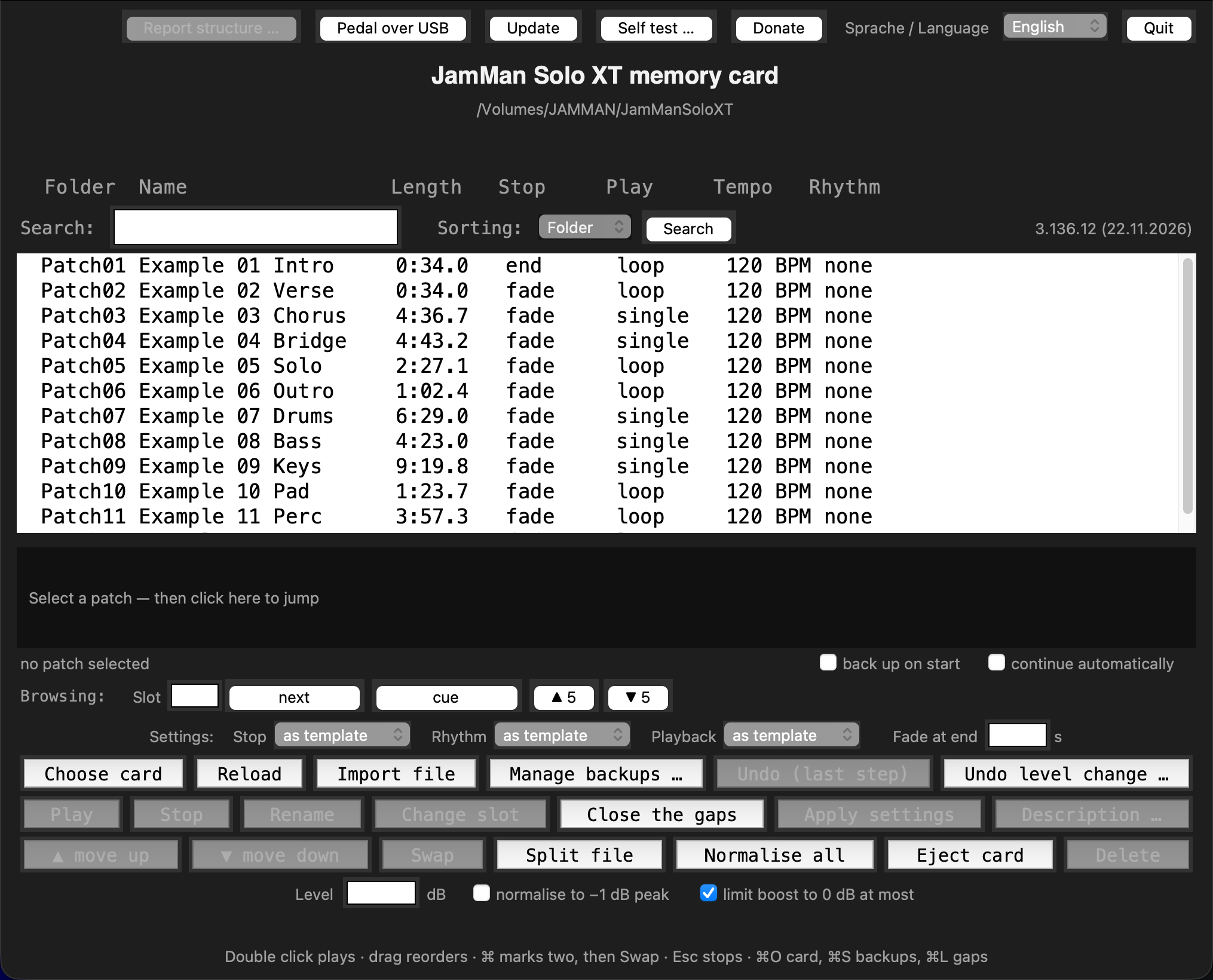
A replacement for JamManager XT (DigiTech, 2012), which crashes on current macOS versions: manage a JamMan Solo XT from your computer — directly on the pedal's microSD card, no driver, no installation, no account.
Cards of the JamMan Stereo and the JamMan Delay are recognised too: same layout, only the device folder is named differently. Confirmed on real pedals — Stereo in November 2026 (Kubuntu), Delay on 20 November 2026 from the XML files of an owner. Still: copy the card before writing to it for the first time.
An unknown JamMan device is no longer turned away: the tool opens it in read-only mode — look, don't write — and on request writes a structure report (folder names and XML, no audio, none of your text) that the owner may pass on. That is how a device nobody here has seen can be confirmed.
First start on macOS: the bundle is not signed, so macOS stops it once (“developer cannot be verified”). Right-click it → Open → Open again. After that it starts like any other program.
Intel and ARM (Apple Silicon): one file for both — the tool is plain Python without compiled parts. The bundled app is only a start script with an icon. Likewise Windows (64-bit) and Linux (x86_64, arm64); Python 3 with Tk 8.6 is required.
Current: 3.136.19 — new:
a desktop starter on all three systems (Windows, macOS,
Linux, with its own icon), a start on Windows that works again
(the Microsoft Store placeholder is no longer mistaken for Python; console and
window use separate interpreters) and help in the language you
chose — -h now follows JAMMAN_SPRACHE and the
system language. Still there: unknown devices open read-only with a structure
report, a sortable list in all five languages, the JamMan Delay
as a third device, progress bars for every backup, normalise and clean-up run,
and a self test per button, no pedal, no account. Also fixed: the aktualisieren command — it aborted with a
TypeError on older builds, exactly where it is needed.
Updating from an older build: press
“Aktualisieren” and restart. The current release sits
flat in the package so the old search routine finds it, and it
tidies itself up on first start: the program moves into
.jamman/, extra starters and text files into the help folder, nothing
deleted. Nobody has to download by hand any more.
Firmware: what that means. The pedal runs a small
QNX system; its firmware is a set of eight files (user interface, loop engine, USB
driver, libraries). The tool fetches them from the newer pedal and writes them to the
older one — with a backup first and a size check after every file. An
interruption can make the pedal unusable; the only way back is the backup on
the computer. Details are in README.md inside the package. On 18 Nov 2026
a Solo XT was moved from 5376 to 5632 this way (display showing "1.06").
Put the card into the computer: take the microSD out of the pedal and insert it into a card reader or a card slot. Or connect the pedal by USB: it does not show up as a drive, it speaks a serial protocol, and the tool talks to it directly — the computer does not have to recognise the pedal as a drive.
Free, open source (MIT), no sign-up.
The problem
DigiTech's JamManager XT dates from 2012 and no longer runs on macOS 14 or newer — it crashes on start. That leaves nothing to sort, rename or back up on a computer. On the pedal's microSD card everything is a WAV file with XML beside it; readable, but tedious by hand.
What this tool does
| What | How |
|---|---|
| Browse and audition patches | a list with duration, stop mode, playback, rhythm; clicking the waveform jumps to that spot |
| Listen without a gap | several patches as one file — no pause at the join |
| Reorder | drag rows, ▲▼, swap, place on a free slot |
| Import | WAV directly; MP3, M4A, FLAC, OGG via ffmpeg — converted to 44.1 kHz / 16 bit / stereo |
| Beat the ten-minute limit | split a long recording at pauses or at your own marks, sample-exact, without loss |
| Level | normalise, raise, with 0 dBFS limiting |
| Safety | a backup before every change; on request at start if the card changed |
| Restore | single patches or the whole card from a backup |
| Over USB | card and internal memory: view, upload, back up — no card reader. The list shows duration, stop mode and loop type; the duration comes from the file size and the WAV header, the audio is not transferred |
| Backup as ZIP | everything at once, internal memory included; old backups can be cleaned up |
| Search and sort | search field above the list; sort by folder, name, duration or reverse name |
| Reverse and tempo | play a loop backwards (on the pedal, and in the window for checking), see and set the tempo per patch — the value auto-quantize uses |
| Description per patch | name, artist, genre, rating, tags, text, BPM |
| Tidy the slots | delete a slot, close the gaps — with a backup; setlists follow |
| Firmware | copy it from one pedal to another when two pedals differ |
| Setlists | save a selection as a text file and fetch it back |
Splitting: markers in the waveform
To cut a long recording that has no pauses, set the cuts yourself: Split file opens the waveform, a click sets a marker, a right click removes it — the same times appear as numbers beside it and can be typed in as well. Cuts are sample-exact, and the planned boundaries are shown before anything is written.
Systems
| System | State |
|---|---|
| macOS (Apple Silicon and Intel) | works, in use |
| Windows 10 | works |
| Linux (Ubuntu Studio) | works |
| Android | no — no tkinter, and the card cannot be written |
All it needs is Python 3 with tkinter. For MP3, M4A and
the other compressed formats additionally ffmpeg — not on the
Mac, where macOS converts on its own (afconvert is part of the system). No
other packages.
Python 3.8 or newer is enough — measured over the source, not guessed. Windows versions older than 10 are untested: Windows 8.1 and Windows 7 would need Python 3.8, the last one that runs there. On very old systems the path length (260 characters) and the console character set can get in the way.
- Python for macOS — the python.org build ships with Tk 8.6. Apple's own Python has Tk 8.5, which leaves the window empty.
- Python for Windows — tick "Add python.exe to PATH" in the installer.
- Windows and USB: the tool talks to the pedal over the serial port,
which needs the Python package
pyserial. Without it the tool reports "no pedal found" although Windows knows the port as COM3. The package containspyserial-nachinstallieren.bat— double-click it and you are done. - Linux:
sudo apt install python3-tk(Ubuntu/Debian, tkinter is not included there). - ffmpeg — only needed for MP3 and M4A, not for WAV.
What it does not do
- No USB audio. The pedal is not addressed as an audio device, only as storage (internal memory and card).
- No manufacturer file format — but its JamLists, yes.
JamManager XT did not save its lists as a file, but as rows in
JamManager.db.sqlite. The tool reads them from there (Setlists ▾ → Fetch JamList from JamManager XT …) and stores a text setlist as a new JamList. Setlists are otherwise plain text files. - JamMan Solo HD not tested. Tested on Solo XT and Stereo.
Languages
German, English, French, Spanish, Chinese — switchable in the window at the top right,
or with --sprache on the command line.
Getting started
git clone https://github.com/Suilui1/jamman-card-tool.git
cd jamman-card-tool
./JamMan-macOS.command      # macOS
JamMan-Windows.bat          # Windows  (double-click)
./JamMan-Linux.sh           # Linux
On Linux the file must be executable. If
./JamMan-Linux.sh answers “permission denied”, run
chmod +x JamMan-Linux.sh. If chmod answers
“command not found”, the terminal is not in that folder — cd into
the unpacked folder first. bash JamMan-Linux.sh also works without
the execute bit.
Every file carries its system in the name; the old short names
(JamMan.command, JamMan.bat, JamMan.sh)
still exist as forwarders. There cannot be a single launcher for all three:
Windows only runs .bat on double-click, macOS only
.command, and Linux needs the execute permission.
Or take the ZIP from the releases page and unpack it.
macOS: on first start Apple reports the program as
“not opened” because it is not registered with Apple. Right-click (or
Ctrl-click) JamMan-macOS.command in the Finder → Open →
Open again. After that a double click works.
Free software, grateful for support
The tool is free and stays free. If you find it useful you can contribute via PayPal — credit card works too, no PayPal account needed.